
VISUAL FEEDBACK
Visual feedback pinned to the exact element
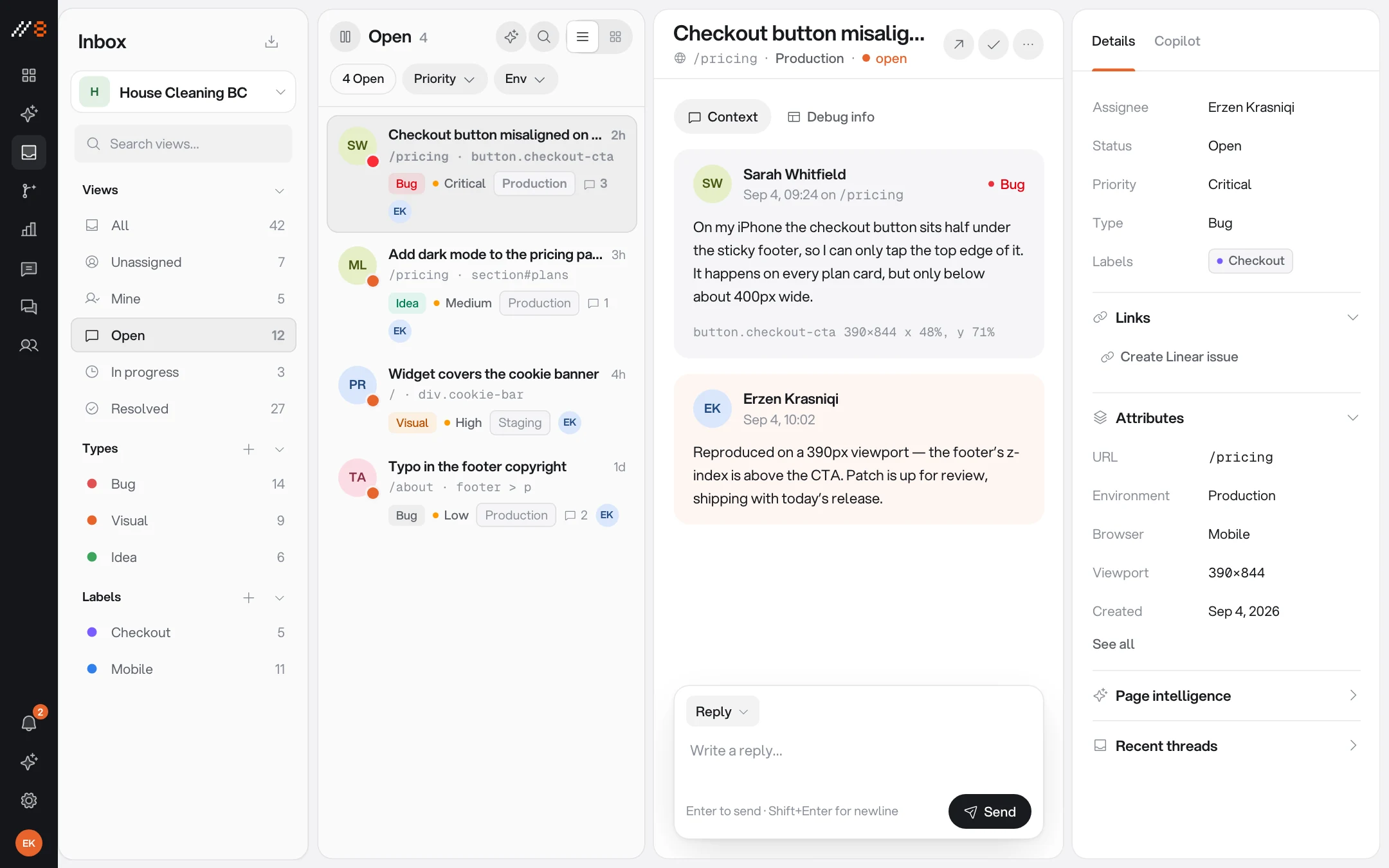
Click any element on your live site and leave a comment right there, or drag a box around a whole region. Every thread arrives with the browser, the viewport, and the URL already attached — nobody has to describe what they are looking at.
INCLUDED
What a pin carries
The point of pinning is that the report describes itself. Page context is recorded by the widget; reviewers choose the screenshots, recordings, and notes that best explain the issue.
The element itself
The comment records the DOM element and its CSS selector, keeping the report tied to the page context rather than only to screenshot coordinates.
Screenshots
Of the element or the full viewport, captured at the moment the comment is left.
Screen recordings
A clip with console errors and failed network requests attached, so bugs arrive reproducible instead of anecdotal.
Voice notes
Reviewers who would rather talk than type record straight into the thread.
Region select
Drag a box around a whole area when the problem is the layout, not one element.
Session context
Browser, viewport, operating system, and URL — attached to every thread automatically.
FROM PIN TO DONE
A report is only useful once it moves
Pins land in a real inbox with the workflow around them, not a list you export to somewhere else.
Your own taxonomy
Issue types, labels, priorities, and assignees — bug, copy, visual, performance — instead of someone else's categories.
Automations on arrival
Rules that label, assign, prioritise, and notify the moment feedback arrives.
AI triage on Pro
On eligible threads, AI suggests a type and priority, flags likely duplicates, and drafts a reply within your plan allowance.
Tracker push
Push a thread into Linear, Jira, GitHub, GitLab, Asana, or Trello as an issue that links straight back to the page it came from.
Guest reviewers never pay
Clients and stakeholders comment through a share link with no account — 3 on Free, unlimited on every paid plan.
Every environment
Separate feedback lanes for development, staging, and production on the same project key.
PUT IT INTO PRACTICE
Make your next review easier to act on
Use these guides to plan a review, capture clear evidence, and check the result before release.
Visual feedback starts on Free with three guest reviewers. Paid plans add screen recording, integrations, live chat, and analytics. Analytics also requires project enablement and visitor consent.
Website Feedback Widgets: Choose, Install and Test
Choose a website feedback widget for forms, visual comments, or feature requests. Follow an installation, privacy, and end-to-end review checklist.
WordPress Website Feedback: Widget Setup & Client Review
Add a WordPress feedback widget, configure staging hosts, review page templates as a client, and verify revisions before website sign-off.
Webflow Website Feedback: Staging Reviews & Widget Setup
Install a Webflow feedback widget with site-wide custom code. Review published CMS pages, responsive layouts, and client revisions on the right host.
Next.js Feedback Widget: React & App Router Setup
Add a Next.js feedback widget through the shared layout. Configure preview hosts, test React navigation, and collect reproducible website bug reports.
Website Design Feedback Checklist
Review website design with a practical checklist for hierarchy, real content, responsive layouts, interaction states, and clear feedback.
Website Launch Checklist: From QA to Release
Use a website launch checklist for production settings, redirects, indexability, forms, monitoring, and rollback, with a downloadable worksheet.
Client Website Review Template & Approval Worksheet
Give clients a website review worksheet for factual copy corrections, visitor tasks, design decisions, and scoped approval. Download the free template.
Visual Bug Reporting: A Practical Evidence Guide
Learn how to report visual website bugs with viewport context, design references, focused screenshots, and verification across nearby states.
Screenshots vs Screen Recordings for Website Feedback
Choose screenshots or screen recordings for website feedback using practical examples, a capture plan, and guidance on browser and privacy limitations.
Website Bug Report Template: A Clear Example and Checklist
Use a free website bug report template with reproduction steps, expected and actual results, browser context, and a worked checkout example.
How to Collect Website Feedback Without Losing the Context
Build a website feedback process for client reviews: scope each round, collect actionable comments, triage decisions, and verify changes before sign-off.
Website UAT Checklist: Test Real Journeys Before Launch
A practical website user acceptance testing checklist with example test cases, mobile and keyboard checks, a downloadable CSV, and clear release criteria.
ONE WORKSPACE
It comes with the other three
Every surface shares the same inbox, the same team, and the same project key. Turning one on never means installing another.
PUT IT TO WORK
Choose a practical workflow
Start with a review process your team can follow, then adapt the checklist to the release.
Website feedback for web design agencies
Run focused client website reviews with pinned comments, screenshots, clear ownership, and a practical handoff process for your agency.
Review website designs in the browser
Review implemented website designs with pinned feedback, realistic content, responsive checks, and clear decisions about layout and interaction.
Free review templates
Download editable bug reports, client review requests, and launch checklists, with examples that show what to include.

Point at the pixels instead of describing them
One script tag, and the people reviewing your work never need an account.
Free forever plan · No credit card · 3 guest reviewers included