
LIVE CHAT
Live chat from the widget you already installed
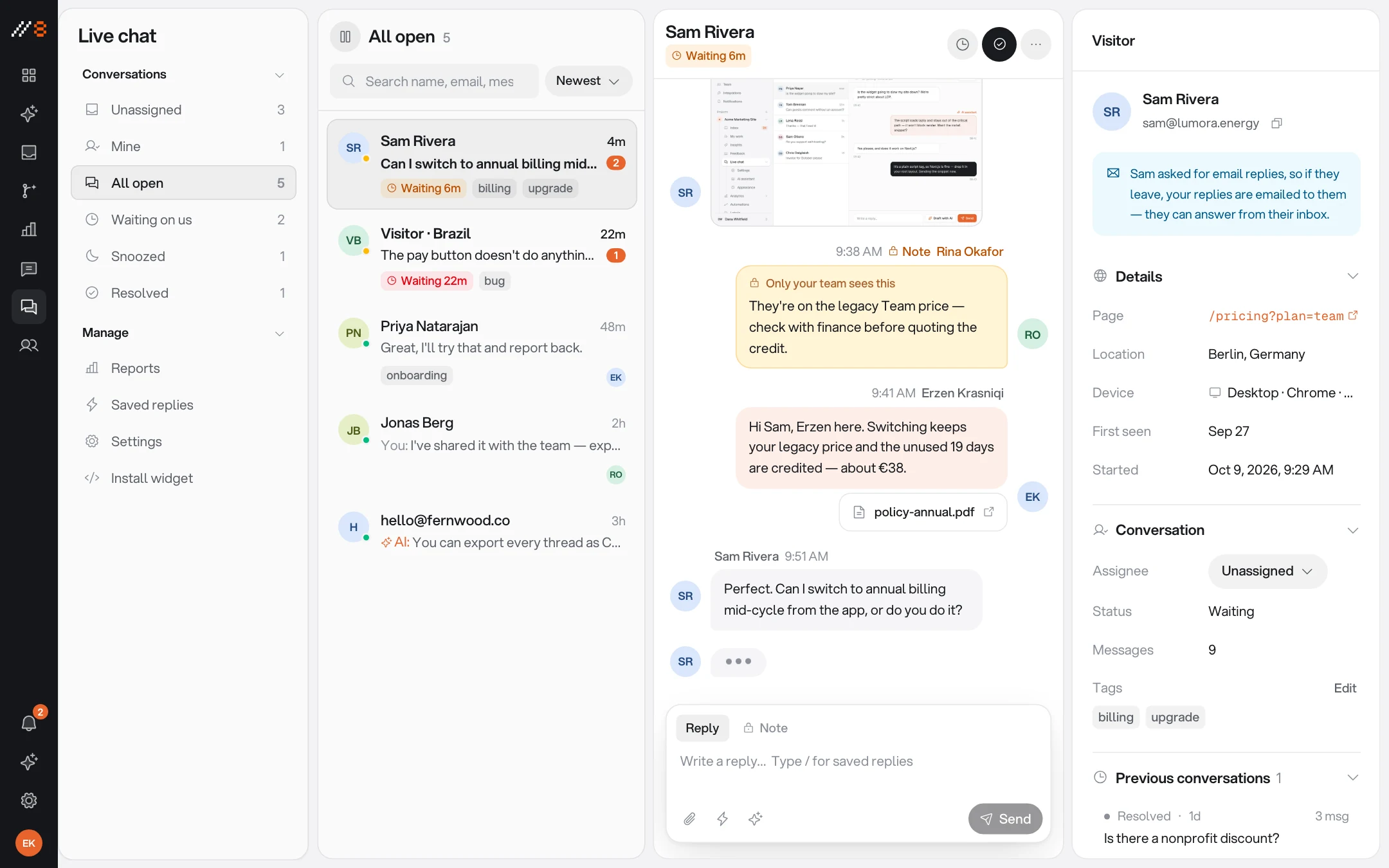
The same widget that collects feedback answers your visitors' questions. Conversations land in the dashboard next to the feedback — same team, same inbox, no second tool bolted onto the page.
INCLUDED
One widget, both jobs
A visitor with a question and a reviewer with a bug are the same person a minute apart. The widget treats them that way.
The same inbox
Chat conversations sit in the dashboard beside your feedback threads — one queue for the team, not two tools with two states of mind.
An AI assistant, on your context
Your team can draft replies from your product context. Visitor-facing auto-replies require an adult-business project and deployment enablement.
Conversation basics done right
Typing indicators, read receipts, and conversation ratings — the mechanics visitors expect from chat.
Full appearance control
The launcher, the panel, the accent, the corner it lives in, light or dark — tuned from the dashboard to fit your product.
Status at a glance
Open and resolved conversations, filterable, with chat statistics beside the inbox.
No second script
Chat ships inside the widget that is already on the page. Turning it on is a setting, not an integration project.
TUNED FROM THE DASHBOARD
Every conversation setting lives in one place
Chat has its own settings pages in the dashboard — behaviour, the AI assistant, and appearance — so the widget on the page stays a single script tag.
Chat settings
Turn chat on per project and shape how conversations open, route, and resolve.
AI assistant
Configure what the assistant knows and how it drafts, then let your team send or edit its suggestions.
Appearance
Launcher label, accent, position, and theme — the widget wears your product's clothes, not ours.
Going live
Try chat on staging first: on production domains the widget, chat included, stays hidden until you turn on Show widget in production in the project's settings.
PUT IT INTO PRACTICE
Make your next review easier to act on
Use these guides to plan a review, capture clear evidence, and check the result before release.
Visual feedback starts on Free with three guest reviewers. Paid plans add screen recording, integrations, live chat, and analytics. Analytics also requires project enablement and visitor consent.
Website Feedback Widgets: Choose, Install and Test
Choose a website feedback widget for forms, visual comments, or feature requests. Follow an installation, privacy, and end-to-end review checklist.
WordPress Website Feedback: Widget Setup & Client Review
Add a WordPress feedback widget, configure staging hosts, review page templates as a client, and verify revisions before website sign-off.
Webflow Website Feedback: Staging Reviews & Widget Setup
Install a Webflow feedback widget with site-wide custom code. Review published CMS pages, responsive layouts, and client revisions on the right host.
Next.js Feedback Widget: React & App Router Setup
Add a Next.js feedback widget through the shared layout. Configure preview hosts, test React navigation, and collect reproducible website bug reports.
Website Design Feedback Checklist
Review website design with a practical checklist for hierarchy, real content, responsive layouts, interaction states, and clear feedback.
Website Launch Checklist: From QA to Release
Use a website launch checklist for production settings, redirects, indexability, forms, monitoring, and rollback, with a downloadable worksheet.
Client Website Review Template & Approval Worksheet
Give clients a website review worksheet for factual copy corrections, visitor tasks, design decisions, and scoped approval. Download the free template.
Visual Bug Reporting: A Practical Evidence Guide
Learn how to report visual website bugs with viewport context, design references, focused screenshots, and verification across nearby states.
Screenshots vs Screen Recordings for Website Feedback
Choose screenshots or screen recordings for website feedback using practical examples, a capture plan, and guidance on browser and privacy limitations.
Website Bug Report Template: A Clear Example and Checklist
Use a free website bug report template with reproduction steps, expected and actual results, browser context, and a worked checkout example.
How to Collect Website Feedback Without Losing the Context
Build a website feedback process for client reviews: scope each round, collect actionable comments, triage decisions, and verify changes before sign-off.
Website UAT Checklist: Test Real Journeys Before Launch
A practical website user acceptance testing checklist with example test cases, mobile and keyboard checks, a downloadable CSV, and clear release criteria.
ONE WORKSPACE
It comes with the other three
Every surface shares the same inbox, the same team, and the same project key. Turning one on never means installing another.
PUT IT TO WORK
Choose a practical workflow
Start with a review process your team can follow, then adapt the checklist to the release.
Website feedback for SaaS product teams
Connect SaaS release reviews to useful visual bug reports, product decisions, and issue-tracker handoffs without losing the original page context.
Visual feedback for ecommerce website reviews
Review ecommerce storefronts with clear visual feedback for product pages, carts, responsive layouts, and safe checks of the purchase journey.
Free review templates
Download editable bug reports, client review requests, and launch checklists, with examples that show what to include.

Answer the question where it was asked
Chat lives in the widget that is already on your page — turning it on is one setting.
Free forever plan · No credit card · 3 guest reviewers included